OA DESK <GO>
WORKFLOW INTELLIGENCE / SMALL BUSINESS OPS
Demo metrics labeled. Benchmarks sourced. Founder-led by Alan Salih.
Operations intelligence desk
Map the work. Find the bottleneck. Decide the automation.
Operations Analytica works like a small-business operations desk: workflow diagnostics, source-labeled benchmarks, software demos, and written recommendations before anyone buys a larger build.
Paid starting point
Workflow Quick Audit
One workflow, one bottleneck, one written recommendation before a larger build.
Founder-led by Alan Salih
Redacted examples first
Sample deliverables visible
No fake client results
OA1 / WORKFLOW MONITOR
ACTIVE CONTEXT: DIAGNOSTIC
Disclosure
Dashboard values are illustrative demo data. Benchmarks are external and source-labeled.
INTELLIGENCE FEED
PUBLIC / SOURCED
- 01Work-about-work pressure remains a clear automation signal.Asana benchmark
- 02Manual repetitive tasks are still a major target for workflow cleanup.Smartsheet benchmark
- 03Process intelligence helps identify automation use cases before implementation.Deloitte benchmark
AUTOMATION CANDIDATE MATRIX
SAMPLE MODEL
WorkflowSignalActionStatus
Follow-up chasing
Memory dependent
Tracker + reminders
Review Copy-paste entryRepeated fields
Form to record
Candidate Weekly reportingManual consolidation
Source view
Measure Software setupIndustry-specific workflow
Demo request
Scope
READINESS LENS
ILLUSTRATIVE
Operations intelligence feed
The website should feel like an active desk, not a static brochure.
These signals explain what Operations Analytica watches before recommending an audit, a cleanup sprint, or a software demo. They are context signals, not client results.
Repeated admin work is the first automation screen.
Look for repeated data entry, follow-up chasing, status checking, and report rebuilding before buying tools.
Property work breaks when map records and follow-up live apart.
Land Analytica is positioned around a real estate map, CRM record, owner outreach, comps, and next action in one screen.
Energy teams need signal, asset, company, and risk context together.
Energy Analytica is positioned as a market-analysis workspace for infrastructure, profiles, alerts, and analyst workflow.
Demo data and benchmarks must be visibly separated.
The site labels concept screens, links sources, and avoids presenting sample dashboard values as client performance.
Value before the ask
A professional diagnostic process should teach you something before it sells you anything.
The site is built around a simple principle: if the workflow is not clear, automation is premature. These are the checks Operations Analytica uses before recommending an audit, cleanup sprint, or software setup.
Map the work as it happens
Capture the real intake, owner, handoff, decision point, follow-up, and output. No idealized diagram first.
Separate symptoms from bottlenecks
A slow report, missed follow-up, or messy spreadsheet is usually a symptom. The work is finding the repeatable cause.
Choose the lightest useful fix
The recommendation may be a checklist, a CRM view, a reminder rule, a small automation, or a dedicated workspace.
Protect the business context
Start with redacted examples. System access, sensitive data, and credentials are not required for the first diagnostic step.
Question
Why it matters
Who owns the next action?
If ownership is unclear, automation will only move confusion faster.
Where does the same information get copied?
Repeated data entry often reveals the first useful automation candidate.
Which status is hard to see?
Visibility problems usually need a shared operating view before complex tools.
What decision should happen sooner?
Good automation reduces delay around a decision, not just clicks on a screen.
Paid diagnostic
The Workflow Quick Audit is for teams that want a written recommendation.
You send one repeated task. Operations Analytica reviews the workflow, maps the bottleneck, and returns a practical action report before you decide whether cleanup, automation, or software setup is worth it.
Current-state map
A structured breakdown of the steps, handoffs, delays, duplicated entry, missing status, and repeated manual work.
Automation opportunity
A plain-English recommendation showing what can be simplified, automated, tracked, delegated, or intentionally left alone.
Next-step decision
A clear recommendation: pause, improve manually, or move into a focused cleanup sprint.
Read the sample audit, try the workflow check, and review the benchmark sources before submitting anything.
No guaranteed revenue claims, no fake client results, and no claim that every workflow needs AI.
The output is a decision document: what is happening, what is blocking the flow, and what should happen next.
Industry context
Why workflow automation starts with a small audit.
These are external benchmarks, not Operations Analytica results. They explain why repeated admin work is a strong place to look first, and why the audit focuses on one workflow before recommending automation.
McKinsey estimates that current technologies, including generative AI, could theoretically automate activities that account for about 60-70% of employee time.
SourceAsana reports that 60% of work time can be spent on coordination, searching, communicating about tasks, and other work about work.
SourceSmartsheet reports that over 40% of workers surveyed spend at least a quarter of the work week on manual, repetitive tasks such as email, data collection, and data entry.
SourceIn Smartsheet's automation research, 59% of information workers said they could save six or more hours per week if repetitive tasks were automated.
SourceDeloitte found that 63% of surveyed executives believe process intelligence accelerated discovery and helped identify automation use cases.
SourceThe audit turns those broad industry signals into one specific decision: which workflow should be simplified, tracked, automated, or left alone first.
Research and catalog desk
Public artifacts make the offer easier to inspect before a conversation.
A serious operations-intelligence site should show work product, not only ask for leads. These documents give prospects something concrete to review before deciding whether to request an audit or software walkthrough.
Austin real estate automation report
Industry-specific report for agencies evaluating lead flow, follow-up, property research, and workflow automation opportunities.
Land Analytica catalog
Real estate analysis and CRM software catalog with map workspace positioning, agency workflow, and implementation path.
Download Land catalogEnergy Analytica catalog
Energy market analysis software catalog with infrastructure mapping, market signals, company profiles, and analyst workflow.
Download Energy catalogWorkflow Quick Audit sample
Shows the actual deliverable style: current-state map, bottleneck, risk, recommended fix, and next-step decision.
Inspect sample auditWhere automation usually pays off
Operations Analytica looks for repeatable workflow pressure.
The audit is not about replacing people. It is about finding the small operational loops that keep consuming attention every week.
Audit lens
Map the path, find the branch, automate the right next step.
Intake and requests
Customer forms, consultation requests, missing details, and routing questions that repeatedly land in email or chat.
Follow-up and reminders
Manual reminders, document chasing, appointment follow-up, quote follow-up, and status nudges that depend on memory.
Reporting and visibility
Weekly reports, spreadsheet updates, owner updates, and manager check-ins caused by unclear status tracking.
Handoffs and approvals
Work that gets stuck because ownership, timing, approval status, or next action is spread across several tools.
01
Map
What happens today?
02
Measure
Where does time or risk repeat?
03
Decide
Automate, simplify, track, or pause.
Software demos
Two product-style workspaces, shown as real interface previews.
Operations Analytica offers focused software demos for industries where map-based analysis, CRM records, follow-up, and reporting belong in one operating screen.
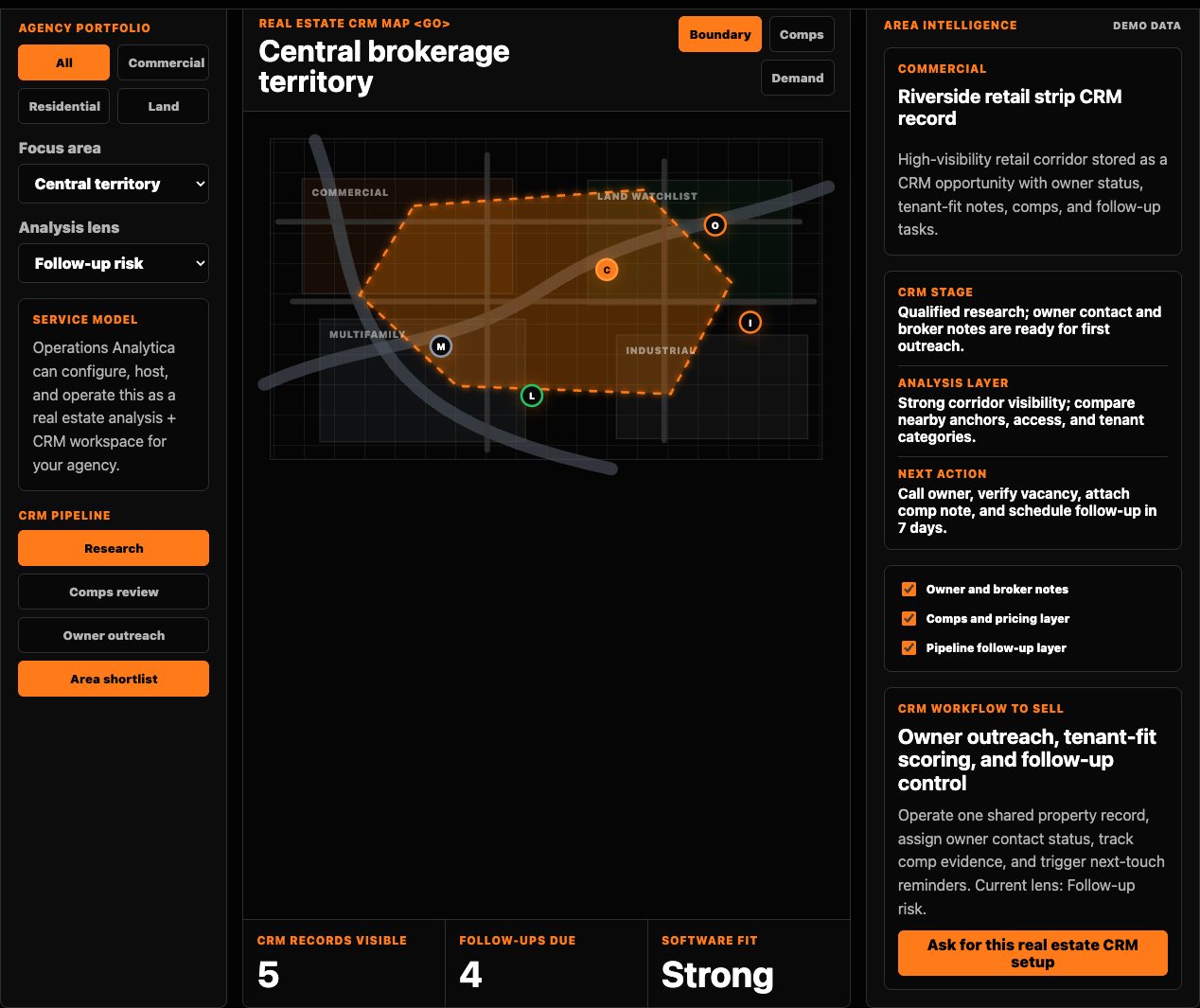
Land Analytica
Real estate analysis + CRM software
For real estate agencies that need land analysis, property records, owner outreach, comps, site notes, and deal follow-up in one workspace.
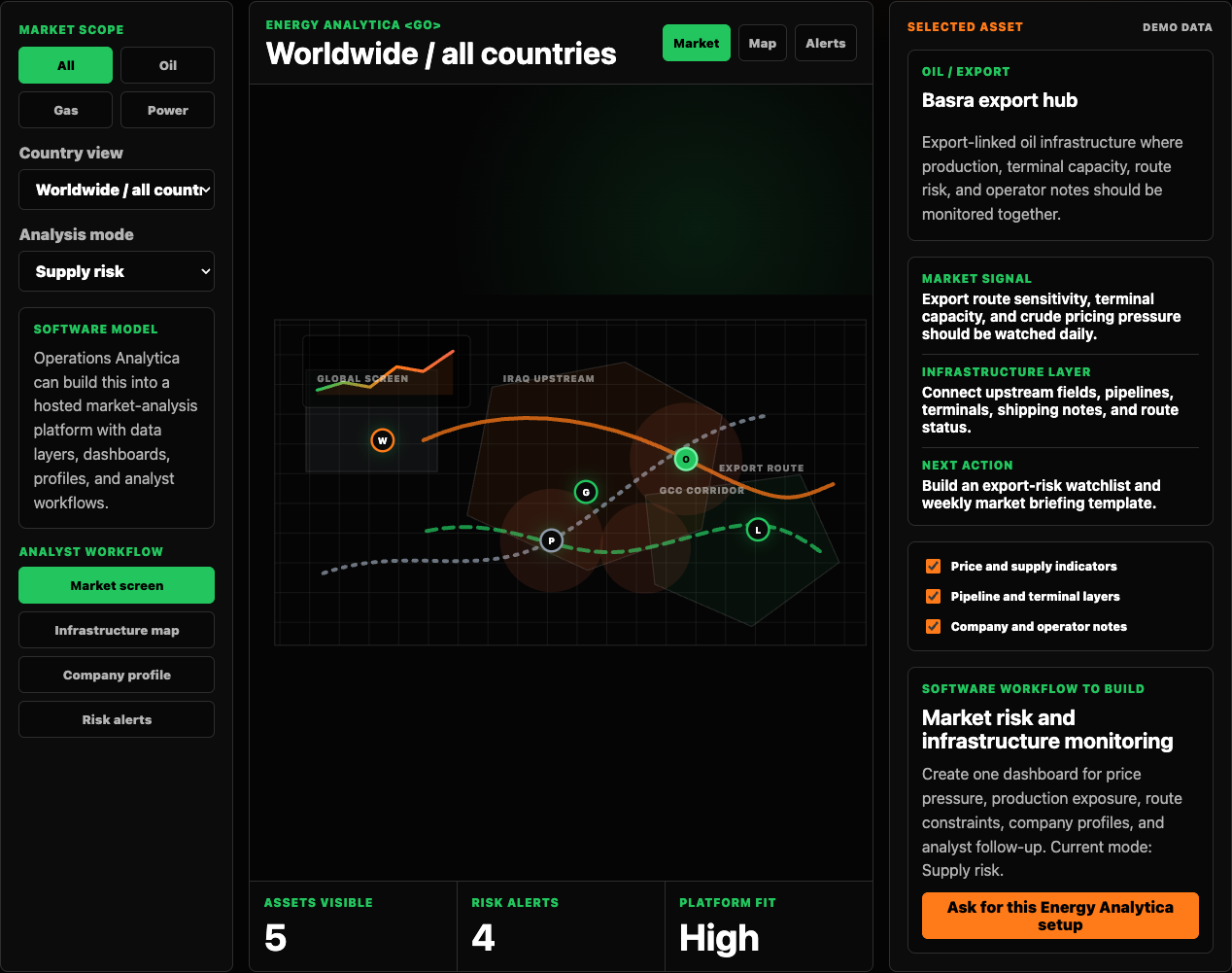
Energy Analytica
Energy market analysis software
For teams that need price, supply, country exposure, infrastructure, company profiles, risk alerts, and analyst follow-up in one platform.
Software demo request
Ask for a software walkthrough, not an audit.
Use this form when you want to see Land Analytica or Energy Analytica as a software/service setup. This is separate from the paid Workflow Quick Audit.
Different path
The demo request is for fit, setup scope, data needs, and walkthrough timing. The audit form below is only for workflow audit requests.
Clear process
From workflow evidence to a decision-ready report.
Describe the workflow
Start with the task, who touches it, what repeats, and where the work gets delayed or re-entered.
Share only safe context
Use a redacted example. Remove passwords, private customer records, financial details, and anything sensitive.
Receive a recommendation
Get the bottleneck, recommended fix, implementation option, and whether a sprint or software demo is worth pursuing.
Trust signals
Professional, founder-led, and careful with information.
Founder-led
You work with Alan Salih directly, not an anonymous software platform or outsourced support desk.
Secure starting point
No passwords, bank details, or private customer records are needed to begin the audit.
Transparent limits
Concept dashboards and demos are labeled as demo data. Industry benchmarks are linked to their sources.
Practical automation
The audit focuses on useful workflow improvements, not hype, vague AI advice, or unnecessary tools.
Clear deliverable
You receive a written report with the current workflow, bottleneck, recommended fix, and next step.
Working standards
Clear boundaries make the work safer and more useful.
Operations Analytica is built for practical workflow improvement. That means recommendations should be explainable, source context should be labeled, and the first step should not require sensitive access.
Redacted examples first
Workflow descriptions, screenshots, and examples should remove passwords, private client records, banking details, and confidential datasets.
Demo data stays labeled
Software panels, screenshots, and interface previews use demo data unless explicitly stated otherwise. Benchmarks are external and linked.
No forced software build
If a checklist, status view, or manual process cleanup is the right answer, the recommendation should say that.
Pay only for defined work
The audit is a defined written deliverable. Larger cleanup or software work should be scoped separately after the diagnostic step.
Founder-led by Alan Salih
Built from the pressure of managing two companies.
Alan started automating repeated admin work to protect time for revenue-generating activity. Operations Analytica turns that operating habit into a practical audit service for small businesses.
Questions
Simple answers before you contact Operations Analytica.
Is this a free audit?
No. The full written audit is paid. The free value is the public workflow check, sample report, benchmark sources, and software previews.
Do you need access to our systems?
No. Start with a written workflow description and one redacted example. Access is only discussed later if implementation is approved.
What businesses fit best?
Small businesses with repeated admin work: intake, follow-up, document chasing, reporting, handoffs, or quote tracking.
What happens after the report?
You can stop with the audit, improve the workflow yourself, or request a fixed-scope cleanup sprint.
Will every workflow become software?
No. Some workflows need a cleaner process, owner, status view, or checklist before automation makes sense.
Are the dashboard numbers real client results?
No. Product panels and interface screenshots use demo data unless clearly labeled otherwise. Benchmarks are external and linked.
Interactive demo
Try a simple workflow automation check.
These tools are lightweight examples, not a full audit. They help you see whether a repeated task is worth mapping before automation.
Ready
Enter one repeated task to see the bottleneck, readiness score, and first fix.
Order now
Send one workflow note. I will tell you the next step.
Use this form for a short workflow note, direct message, or paid audit request. Software demos use the separate form above.
Direct contact
contact@operationsanalytica.com
For general questions, partnerships, or messages before choosing an audit package.